

October 2026: Reusable Metrics, BigQuery Cost Visibility, and Less Rebuilding
Quick Answer
Reuse more of what teams already built. Mosaic Models can link metrics across models, import existing BigQuery descriptions, and preserve more semantic logic during Apache Ossie imports.
See what BigQuery workloads are costing. Sentinel Cost Intelligence now supports Google BigQuery, while new retention settings give administrators more control over how much monitoring history they keep.
Do more without leaving the workflow. Dashboard authors can explore Mosaic data directly in the Dataset panel, while Report Services Document subscriptions can now be managed in Library.
Enterprise analytics gets expensive in small, repetitive ways. A modeler re-enters descriptions that are already documented in BigQuery. Revenue gets defined again because another model has a different level of detail. A semantic model moves from another platform and database-specific expressions have to be rebuilt by hand. A dashboard author switches tools just to understand the hierarchy behind an attribute.
None of these tasks are especially difficult on their own. Across a large analytics environment, every duplicate definition, manual reconciliation, and extra workflow becomes another thing to maintain, validate, and eventually fix.
October is focused on taking more of that work out.
Mosaic: Reuse What the Business Already Defined
Link Metrics Across Mosaic Models
Revenue should not become a different metric just because one model contains detailed transactions and another contains aggregated data.
Mosaic Models can now link base metrics across models with different levels of detail. Teams can define a metric once and reuse that definition across linked models instead of maintaining another copy every time the data grain changes.
For example, if a team uses one model for live daily transactions and a faster aggregated model for monthly analysis, they no longer need to build Revenue twice. The business definition stays the same even as the data grain changes.
Mosaic can suggest likely metric links during setup, and queries automatically use the linked model with the appropriate data grain. Calculations built on those linked metrics can be reused too.
The practical benefit is fewer definitions to create, validate, and maintain.
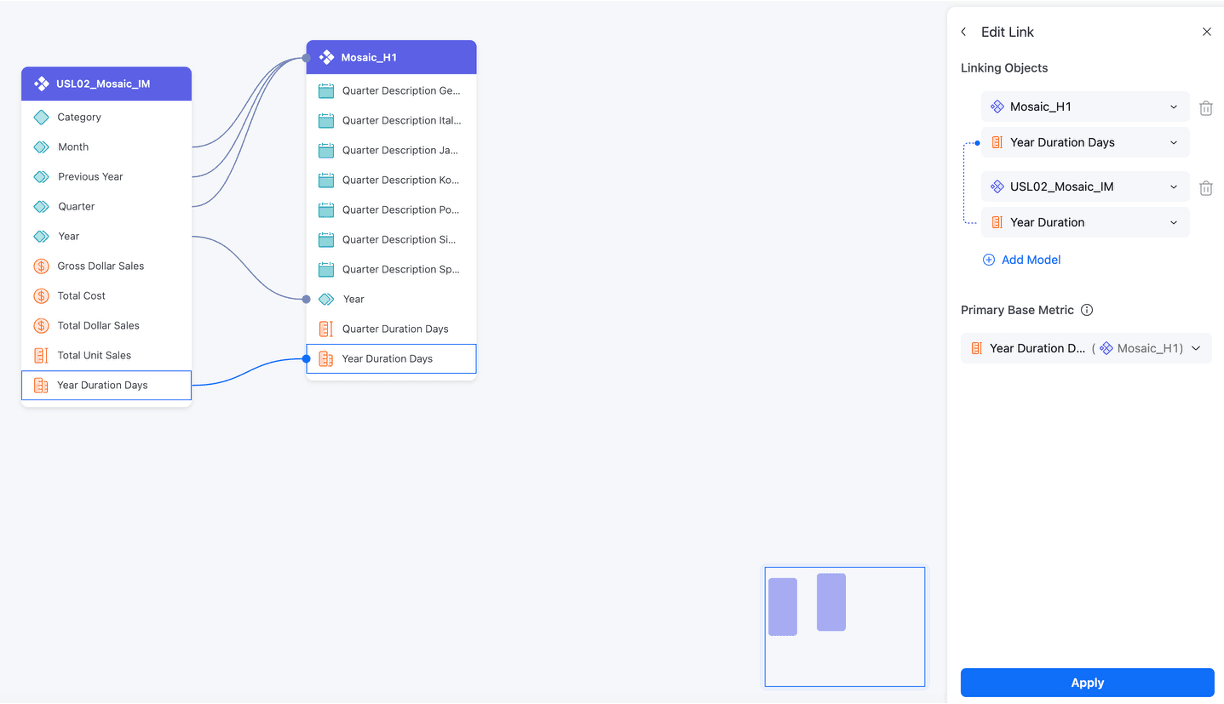
Linking base metrics across Mosaic Models with different levels of detail
Bring Google Knowledge Catalog Context Into Mosaic Models
If table and column descriptions already exist in BigQuery, there is little value in typing them again somewhere else.
When creating a Mosaic Model from Google BigQuery, Mosaic can now import table and column descriptions from Google Knowledge Catalog.
Teams can reuse the metadata they already maintain instead of re-entering it in Mosaic, reducing manual work and another copy of business context to maintain.

Import More Complete Apache Ossie Models
Open model exchange is only useful if the model survives the move.
Real semantic models often contain database-specific functions. When a model moves between platforms using Apache Ossie, formerly Open Semantic Interchange, those expressions can become another manual cleanup project.
Mosaic can now preserve unsupported database-specific functions during Apache Ossie imports by converting them into pass-through expressions for attributes, metrics, and filters.
That means more of the original semantic logic can come across from platforms such as Databricks and Snowflake without someone rebuilding those expressions by hand.
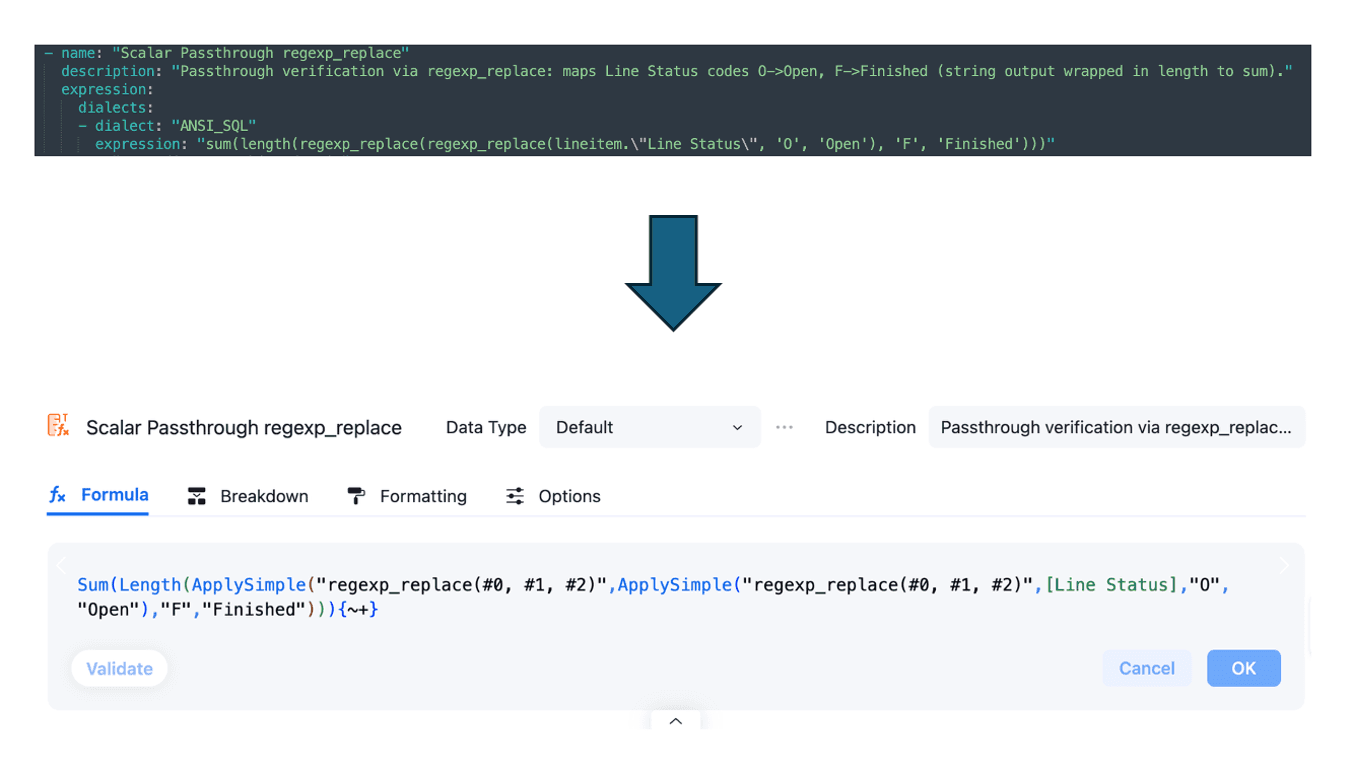
Preserving database-specific functions when importing an Apache Ossie model
Keep Rolling-Window Models From Growing Forever
Not every in-memory model needs to keep every historical row forever.
Mosaic Models now add scheduled delete options at the table level. Teams can remove rows matching a required filter, or delete and reload those rows with refreshed data.
A team keeping a rolling period of recent data in memory can remove older rows and load the new period without republishing the entire model.
Only the selected tables need to refresh, helping teams keep memory focused on the data people actually use.
Sentinel: BigQuery Cost Visibility and More Control Over Monitoring Data
Sentinel Cost Intelligence for Google BigQuery
In June, Sentinel Cost Intelligence connected Snowflake and Databricks spend back to the analytics assets driving it.
October extends that visibility to Google BigQuery.
Administrators can connect BigQuery billing data in Workstation and use Sentinel to monitor data-source compute spending and cost trends through a refreshed summary page.
Instead of cross-referencing a BigQuery bill with a separate analytics catalog, teams can see compute cost in the context of the governed datasets they already manage in Mosaic.
That makes the useful question less about what the cloud bill was and more about what is driving it.
Which datasets are consuming the most compute? Are refresh patterns creating unnecessary cost? Is data being kept or processed in ways that no longer make sense?
Bringing BigQuery into Sentinel gives data and analytics teams a shared view of cost and the assets behind it, making it easier to decide what to change.
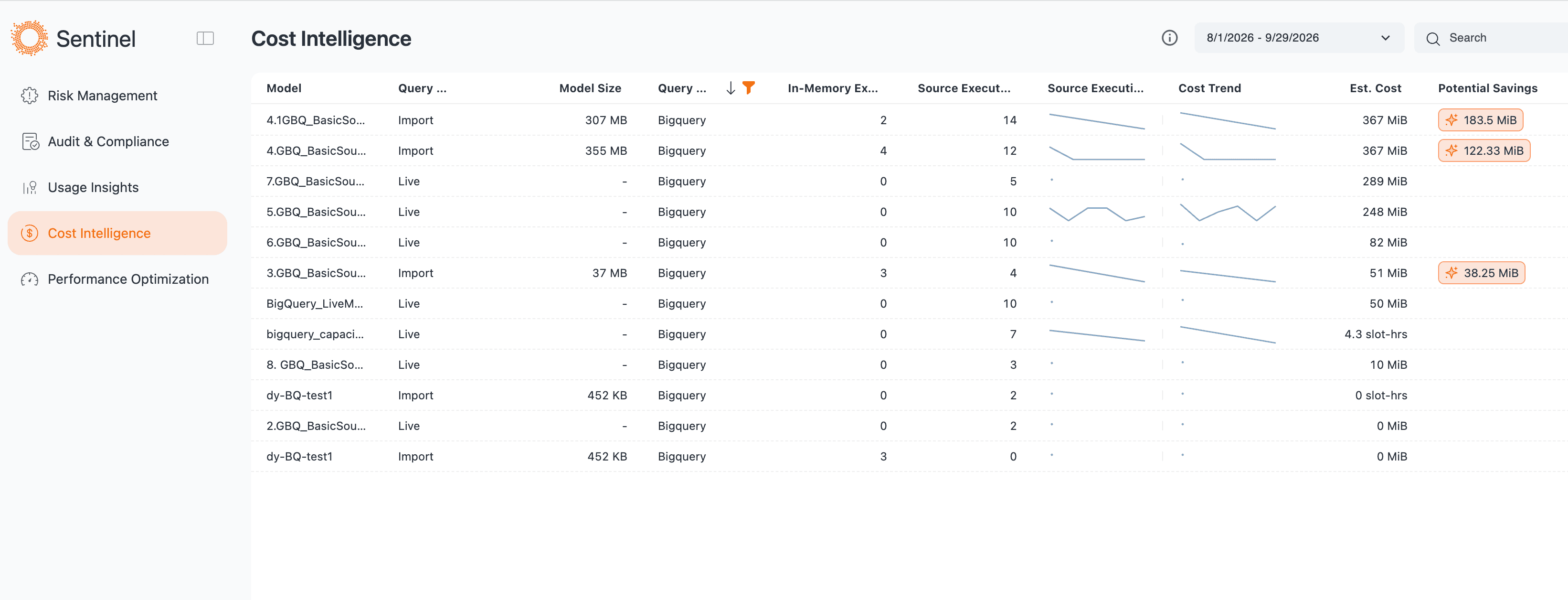
Sentinel Cost Intelligence showing Google BigQuery cost data
Set Retention by Sentinel Module
Monitoring data has its own lifecycle.
As Sentinel captures more cost, usage, performance, and governance information, administrators need control over how much history they keep.
Workstation now lets teams configure retention periods by Sentinel module. Defaults remain in place, including 180 days for most modules and 30 days for Performance, but administrators can adjust those periods based on their own operational or compliance needs.
Sentinel then cleans up data according to the configured policy. Optimized storage and compression also help limit storage usage as monitoring history grows.
Teams can retain the monitoring history they need while keeping unnecessary storage growth under control.
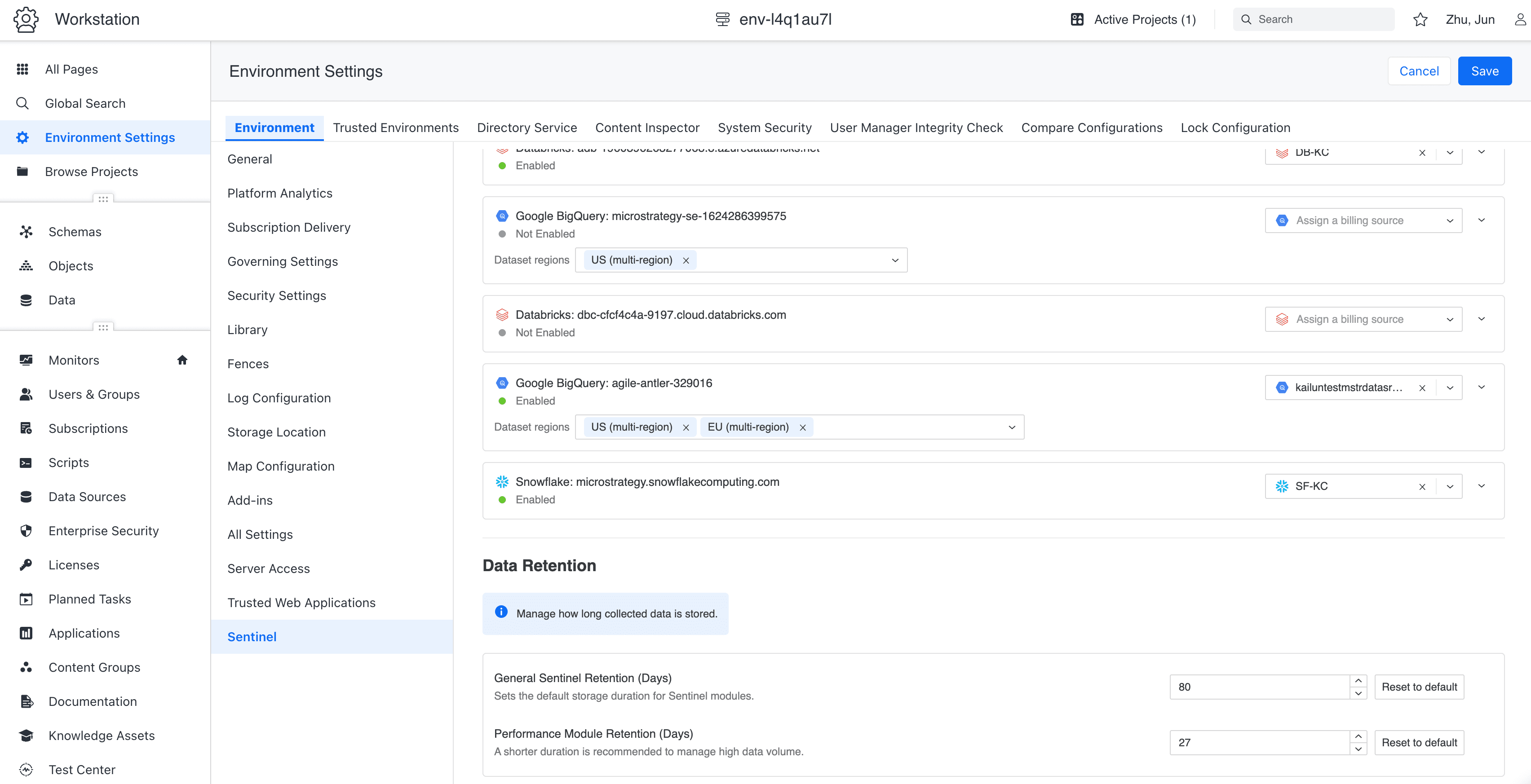
Configuring data retention periods by Sentinel module in Workstation
BI: Stay in the Workflow
Explore Mosaic Model Data While Building a Dashboard
Choosing a field by name is easy. Understanding the data behind it often takes another step.
A dashboard author may need to know which stores belong to a region, which products sit under a category, or what values actually exist before building a filter or visualization.
A new Tree View in the Dataset panel lets authors explore that information while they work.
Authors can expand Mosaic Model attributes to see their elements, move through hierarchies level by level, and search or page through attributes with large numbers of values. The experience is available in Library and the new Workstation dashboard editor.
The benefit is simple: understand the field before using it, without leaving the dashboard to investigate the model somewhere else.
That means fewer wrong turns and less back-and-forth between tools.
Manage Report Services Document Subscriptions in Library
For customers moving users from Strategy Web to Library, scheduled document delivery can be one of those long-standing workflows that still has to work before a migration is complete.
Library now supports subscriptions for Report Services Documents.
Users can schedule RSD delivery through email, file, or FTP in Excel or PDF format, with or without bookmarks. Existing RSD subscriptions created in Web can also be edited or deleted from Library.
A weekly PDF sent to regional managers can keep running. An Excel file delivered to FTP for a downstream process can keep running.
The team managing those workflows no longer has to return to Web just because the subscription was created there.
It removes another operational dependency on the older experience and brings more day-to-day BI administration into Library.
What October Makes Easier
October builds on what teams already have. Linked metrics, imported metadata, and more complete semantic-model imports mean fewer definitions and expressions to recreate or reconcile. BigQuery cost visibility helps teams understand compute spend, while targeted refresh policies and configurable monitoring retention give them more control over memory use and monitoring storage. Improvements to dashboard authoring and document subscriptions also keep routine work in the same place.
Together, these improvements make mature analytics environments easier to operate without forcing teams to rebuild what already works.
Learn more about the October updates on our What's New page and Strategy software product documentation.
Frequently Asked Questions
What is included in the Strategy Software October 2026 release?
October focuses on three areas:
Mosaic models and data management: Link metrics across models, import existing BigQuery metadata, preserve more semantic logic during Apache Ossie imports, and manage rolling-window data with filtered delete and reload options.
More cost visibility in Sentinel: Monitor Google BigQuery data-source compute spending and cost trends, and control how long Sentinel monitoring data is retained.
Less workflow switching in BI: Explore Mosaic data while building dashboards and manage Report Services Document subscriptions directly in Library.
How does October reduce rebuilding in Mosaic?
Teams can reuse metric definitions across models with different levels of detail, import table and column descriptions from Google Knowledge Catalog, and preserve more database-specific logic when moving semantic models through Apache Ossie. Queries can also automatically select the linked model with the appropriate data grain.
The result is fewer duplicate definitions, less manual cleanup, and less business context to recreate.
What does Sentinel Cost Intelligence add for Google BigQuery?
Sentinel can now connect a Google BigQuery billing source in Workstation and show data-source compute spending and trends in a refreshed summary page.
Instead of manually matching cloud bills back to analytics assets, teams can see where compute costs are coming from and use that context to decide what to investigate or optimize.
What changes for dashboard and Library users?
Dashboard authors can use the new Tree View to explore Mosaic Model attributes, values, and hierarchies without leaving the authoring workflow.
Library users can also create and manage Report Services Document subscriptions for email, file, or FTP delivery, removing another reason to return to Strategy Web.

Henry Guo
Henry Guo is Director of Outbound Product Management at Strategy, driving go-to-market and turning customer insights into discovery and validation for its semantic layer and AI products. With 15+ years in AI, data and security, he helps ship trusted secure enterprise platforms with measurable value.
Related posts
Lock-in moved from storage to semantics. Discover why your business context is trapped inside platform engines and what it costs you.

Asim Lilani
July 1, 2026
Discover why BI projects need a semantic layer before dashboards, and how Strategy Mosaic helps teams define governed metrics, business logic, and analytics faster.
.jpeg&w=750&q=75)
Sofia Martino
July 15, 2026
Strategy's July 2026 release cuts analytics handoffs with portable semantics, AWS Bedrock AI, and governed BI deployments.
Henry Guo
July 17, 2026